

Applying for your DGCA Computer Number is the essential first step for anyone aspiring to become a pilot in India. This guide walks you through every detail—requirements, process, and tips—to ensure a smooth application experience. DGCA Computer Number Application
What is a DGCA Computer Number?
A DGCA Computer Number is a unique identifier issued by the Directorate General of Civil Aviation (DGCA). You need this number to:
Register for pilot examinations (e.g., CPL, ATPL).
Track your application status.
Access official exam-related portals.
Having a valid DGCA Computer Number is mandatory before you can sit for any DGCA‑conducted exam.
Application Process Step by Step
Below is the complete DGCA Computer Number Application process. Follow each step carefully.
Create an account on the DGCA portal
Visit the DGCA e‑GCA portal: https://dgca.gov.in
Click “Login/Register” and choose “New User Registration.”
Enter your basic details and verify your email.
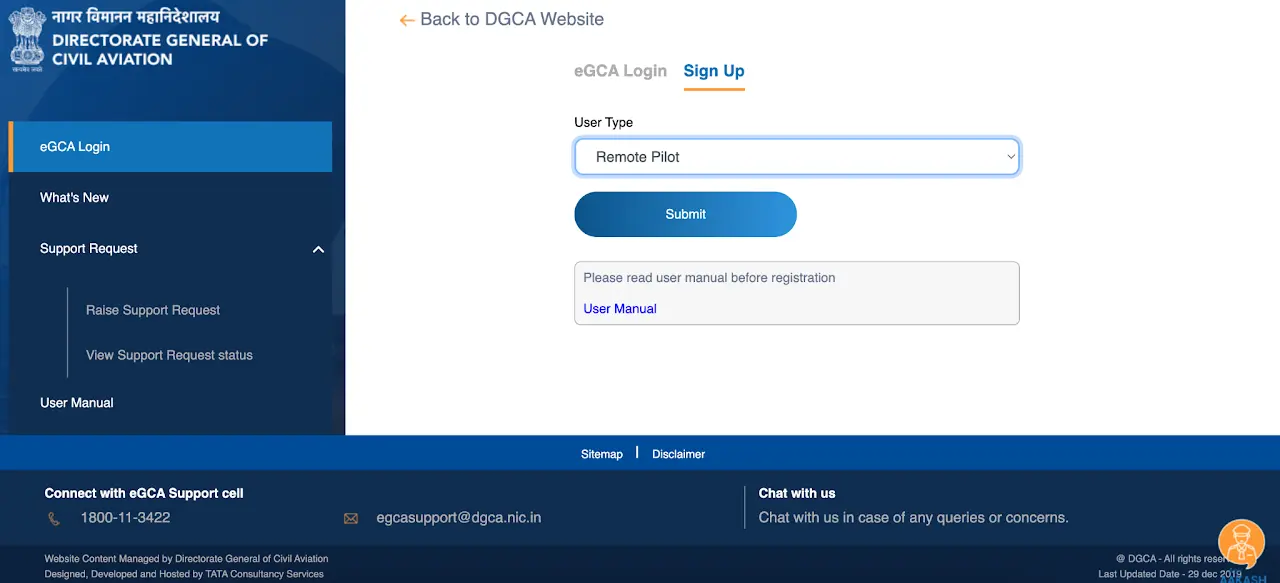
Complete the online application form
Log in with your credentials.
Navigate to “Student Registration” and select “Computer Number Application.”
Fill in personal details, educational qualifications, and passport‑size photo.
Upload scanned documents (ID proof, educational certificates, passport photo).
Pay the application fee
The fee for the Computer Number is payable online via credit/debit card or net banking.
Save the payment receipt for future reference.
Submit and note your application ID
Review all entries.
Click “Submit.”
You will receive an application ID and your DGCA Computer Number within 48–72 hours by email.
Download your Computer Number
Log in again after 72 hours.
Go to “My Applications” and click “Download Computer Number.”
Tip: Save a PDF copy of your Computer Number for all future exam registrations.
Common Mistakes to Avoid
When completing the DGCA Computer Number Application, avoid these pitfalls:
Incorrect photo size or format
Mismatched personal details (e.g., name spelling)
Uploading unreadable scans
Forgetting to pay the fee
Using an unsupported browser (use Chrome or Firefox)
FAQs about Computer Number
Q1: How long is the Computer Number valid?
Your DGCA Computer Number remains valid for life. There is no expiry. You only need it once.
Q2: Can I update my details after submission?
No. Double-check all details before you submit. For genuine corrections, contact DGCA support via email.
Q3: What if I don’t receive my Computer Number?
Check your spam folder. If not found after 72 hours, email DGCA at [email protected].
Q4: Do I need a new Computer Number for each exam?
No. Use the same DGCA Computer Number for all DGCA‑conducted exams (CPL, ATPL, etc.).
Ready to take the next step toward becoming a commercial pilot?
Enroll in Commercial Pilot License (CPL) training or strengthen your fundamentals with our Ground School classes at Airline Prep School.
Contact us today to start your aviation journey!